The reporting layer for waste, recycling & municipal services operations
All the reports you need.
From the data you already have.
256Metrix turns your scale and billing data into compliance, facility customer, and service-area reports to meet all of your regulatory and franchise requirements — without changing a single code in the system you run today.
There's no data migration. No new codes to learn.
Just a powerful reporting layer that works alongside the software you already use to manage your operations.
As exported
As reported
Your codes stay your codes.
We map them; you never re-key them.
Reads exports from
Month-end
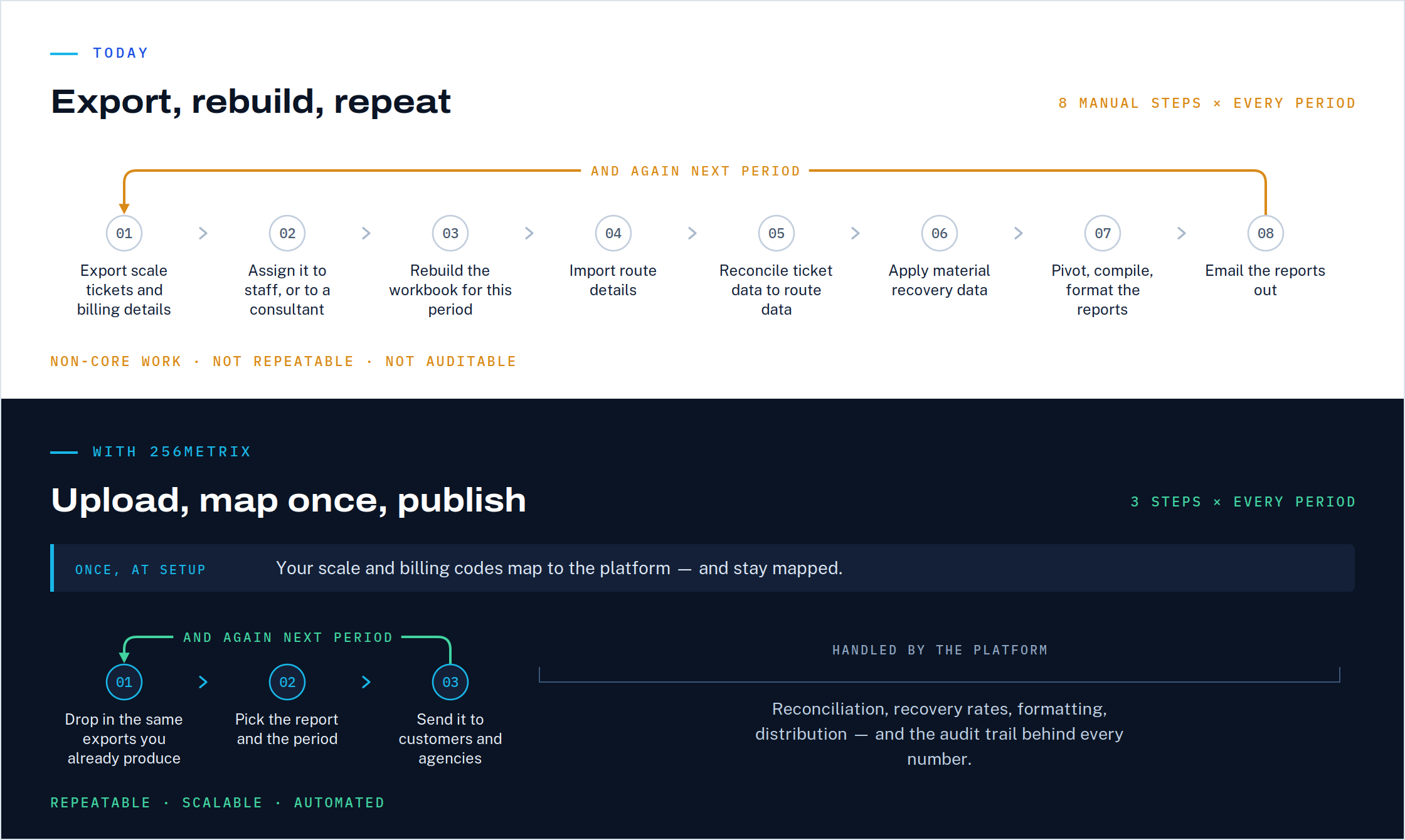
Critical reporting shouldn't live in a spreadsheet — or in someone's head.
Federal, state, county, and local rules all carry recordkeeping and reporting requirements — and so does every franchise agreement and service contract you hold. Operating software wasn't built to answer them, so the work lands on a spreadsheet and the staffers who maintain it.
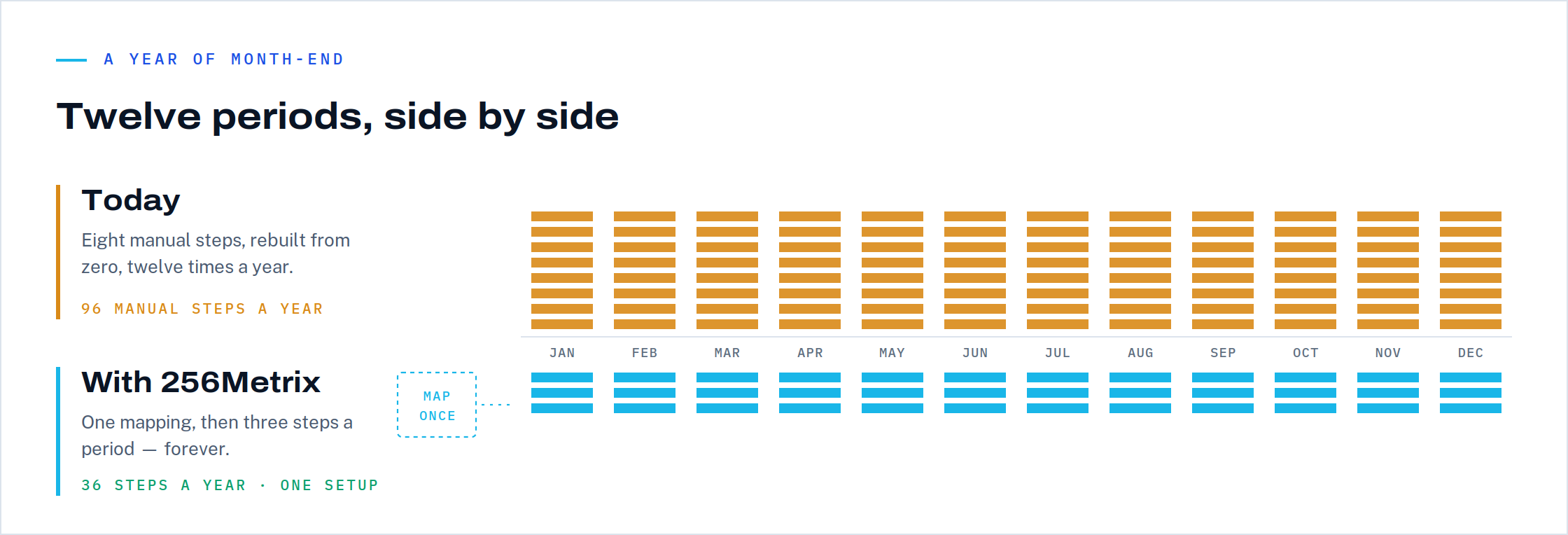
See the difference.
Report library
40+ reports.
Ready on day one.
Branded with your company logo
256Metrix comes ready with the reports this industry actually files — so you’re never starting from a blank canvas. Every report runs against your own facilities, customers, materials, and service areas. Export as Excel, CSV, or PDF.
Dashboard
Mass balance.
At a glance.
Corporate sees every facility. Plant managers see just their own. The month closes when the tons reconcile — so the platform leads with that.
Sample output
See what 256Metrix produces before you schedule a demo.
See six sample pre-formatted reports from the platform. No form or email address is required. You’ll know in about a minute whether the reports meet the requirements of your agency or franchise agreement — which is way faster than a demo call.
Demonstration data throughout. No customer information appears in any sample or screenshot. All downloads ©2026 MDM Analytics, Inc.
Features
Export your data.
256Metrix takes it from there.
From a single facility to an entire network, 256Metrix brings your reporting together — across every type of facility you operate, as well as from third-party facilities your collection vehicles use.
Upload tickets or summaries.
Drag and drop scale ticket lists and inbound/outbound summary files. There's minimal lag between upload and a finished report.
Keep your own codes.
Scale codes and billing codes map to the platform once. No migration . No re-coding. Nothing for the scale house to relearn.
Customize your reports.
Use menu-driven parameters and drop-down lists to create customized reports and view your data in the way you need it.
Ask in plain language.
Ask natural language questions about your own data — and then ask follow-up questions, or request to see the results in a graph or chart. All this happens in a closed environment. No training on your data. No leakage. Used only at your option.
Calculate material recovery automatically.
Automatically calculate recovery from mixed-material streams — by facility and service area, based on your inbound characterization and facility-specific configurations.
Set disposal facility acceptance rules.
Encode the service area and capacity restrictions that govern which disposal facilities your loads can go to. 256Metrix then applies these rules when allocating disposal tons to facilities.
Track trends and facility performance.
View KPI summaries for individual facilities and tonnage trends across your entire company. Every historical period remains just one click away.
Deliver reports automatically.
Send finished reports to facility customers, regulatory agencies, and service area representatives on a schedule.
Utilize 256Metrix on any device.
Access 256Metrix from your desktop, tablet, or phone. There’s nothing to install or maintain, and nothing for IT to roll out.
How it works
Four steps that simplify your month-end reporting.
Setup happens once. Code mapping is automatic. After that, every period is an upload and a drop-down.
Upload your export.
Drag and drop scale ticket lists or summary files directly from your operating system. Simply upload your CSV or Excel files — no integration project required.
Map your codes.
Your material and service codes are matched to the platform's structure once. Facilities, customers, and accounts lists stay self-service from there.
Run the report.
Choose the report, facility, and period. Or ask the AI assistant a question and get the numbers behind the answer.
Send it out.
Publish to customers, agencies, and service areas — automatically, on the schedule your agreements require.
Where we fit
AI in this industry sorts material. We do the accounting and reporting.
Most of the AI you read about in waste and recycling works on the belt or on the truck — vision systems identifying materials, sensors calling for pickups, and models planning routes. All of it generates more data, in more categories, from more places than ever. But generating the data and turning it into something you can actually use are two different jobs.
We don't use AI to calculate your numbers
A sorting model is probabilistic, and on the sorting line that's fine — misidentify one bottle and you lose pennies. A compliance report can't work that way. Your reports are deterministic: the same inputs produce the same totals every period, traceable back to the tickets behind them. The AI assistant is an alternative way to ask questions about that record, not a way to produce it.
The better the sorting gets, the more data there is to account for. And that's where we come in.
Platform fit
Built to work with what you already run.
256Metrix doesn’t replace routing, scale, or billing software. It uses what those systems already produce to complete the reporting process. It's the last mile between your operating system and the reports you actually have to deliver.
Works with any source system.
256Metrix is the perfect fit for waste management companies and municipal departments, regardless of the software they use for daily operations. The platform adapts to the data your system exports — not the other way around.
Data stays where it lives.
Files are mapped, not moved. Nothing is re-coded, no system of record is displaced, and there's no cutover to schedule.
Your company data is isolated.
Company-level data isolation and self-service user administration make it easy to bring a new operation online without custom engineering.
Eliminate spreadsheets and pivot tables.
Most operating platforms stop short of compliance, customer, and service-area reporting. 256Metrix provides a pre-built analytics and reporting layer designed specifically to fill that gap.
Security
Protection — by design — for your most sensitive data.
Customer lists and tonnage are the most sensitive records in this business. That's the reason many operations have held back from automating this work at all — so for 256Metrix, the controls came first, not last.
- AuthenticationMulti-factor user authentication on every account.
- IsolationCompany-level data isolation. Your tonnage and customer records are never pooled with anyone else's.
- AI boundaryThe AI assistant runs in a closed environment — no training on your data, no leakage outside your company.
- AdministrationSelf-service user and access management, so you control who sees which facilities.
- SharingControlled distribution to facility customers, service area representatives, and outside facilities used by your vehicles.
In development
The next piece is in the field.
Reporting starts at the scale house, but it doesn't end there. Every collection company runs account service teams who spend their days at account locations — and almost none of that work lands anywhere a report can reach. We've built a tool that closes that gap.
What the field teams already do
Your account service representatives visit collection accounts all week, performing a variety of tasks.
What we're adding
Log on from any tablet or browser.
There is nothing to install or set up. The same login gives you access in the truck, in the field, and in the office.
Manage assignments, monitor progress.
Your accounts manager can make team assignments and see what each representative has completed, what’s in progress, and what’s outstanding.
Capture photos.
Document contamination, overfilled containers, blocked access — with photos taken at the location and attached to the contact record.
Email from the field.
Send the inspection report or a new service agreement to the account contact before leaving the site.
to the right account.
Field contact records pull from your accounts and services tables. When a representative opens a record, the account name, service address, and the services currently provided are already there — There is no re-keying, no separate customer list to maintain. Every field visit stays connected to the same data used throughout your reporting.
If field service reporting is a challenge for your operation, let us know when you request a demo.
Request a demo
See a month closed, start to finish.
The walkthrough runs on export files from a sample company with multiple operations — recycling and trash collection, MRF, composting facility, C&D Debris processing facility, landfill. Nothing of yours required. When you're ready to see it on your own tickets, that's the next conversation.
30 minutes · live, not a slide deck
Sample data, multiple facilities, real export formats
Your own file only when you want to, never to get started